背景知识
对标题提到的知识不熟悉的,这里推荐几个学习的地方:
- Vue3 - https://cn.vuejs.org/guide/introduction.html
- JSX - https://cn.vuejs.org/guide/extras/render-function.html
- Typescript - https://ts.xcatliu.com/introduction/what-is-typescript.html
工程搭建
脚手架
先来说下如何搭建个 Vue3 + Ts 的脚手架,这也分两种情况,下面分开说:
- 从零开始
从零开始的话可以使用 create-vue,即官方的项目脚手架工具,提供了基于 vite + Ts 的脚手架模板。
更多的使用细节,见官方文档 https://cn.vuejs.org/guide/typescript/overview.html#project-setup
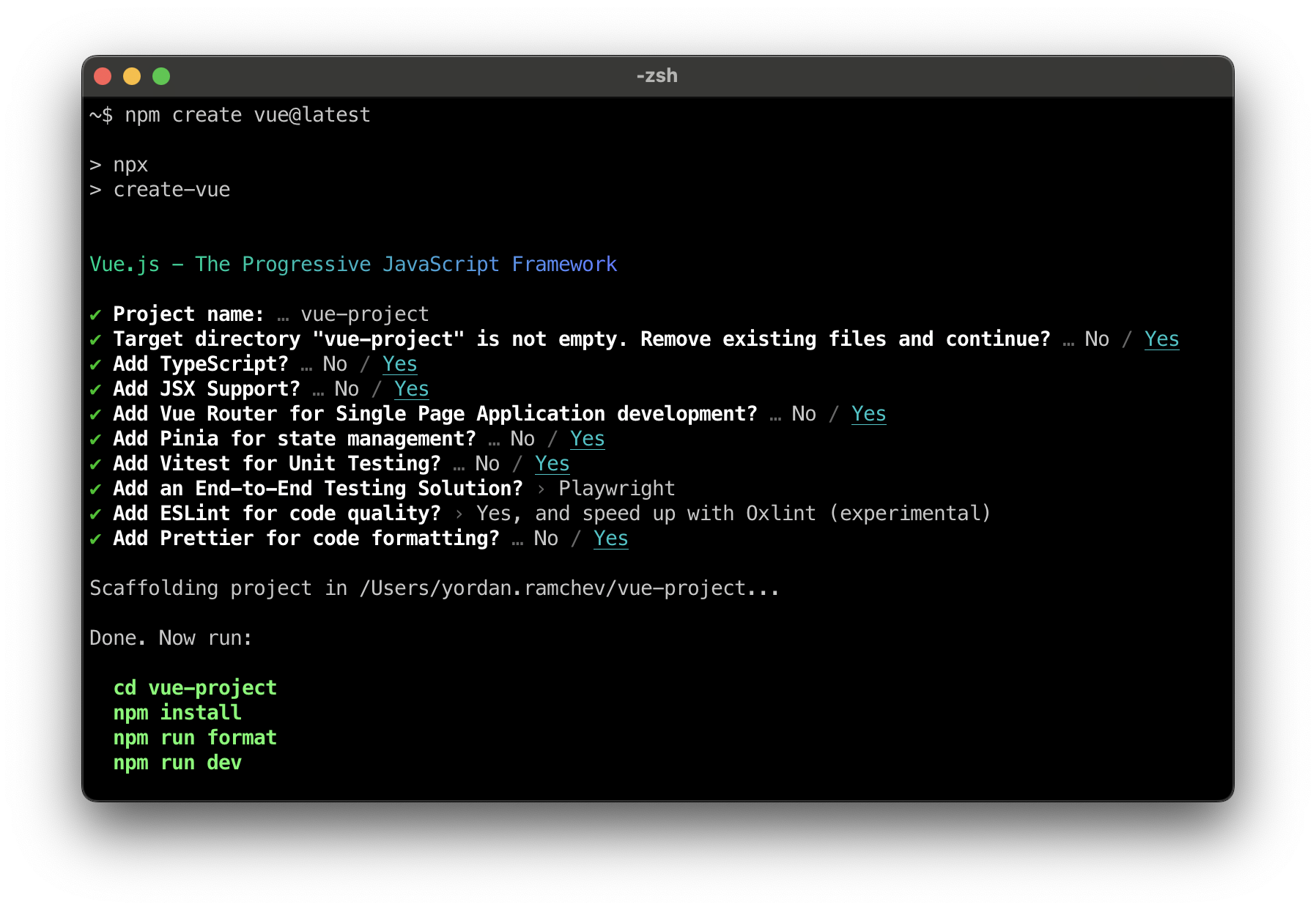
Vue 之前还提供过一个 Vue CLI 工具基于 webpack 平台,也可以用来生成 Vue3 的脚手架,但是现在已处于维护状态,官方也建议基于 vite 平台开发,因此这里就不过多介绍了。
- 脚手架升级
第二种就是在现有的脚手架上添加上 Typescript ,这种情况就不好说了,原先的脚手架可能是 Vue CLI 生成的,create-vue 生成的,或者直接用 webpack,rollup 等工具手撸出来的,可能性太多,我也没办法枚举出来。
这里我列下我在网上找到了,如何在现有的项目中添加 TS 的文档,可以参考下:
- Vue CLI:https://github.com/vuejs/vue-cli/tree/dev/packages/%40vue/cli-plugin-typescript
- Vite:https://cn.vitejs.dev/guide/features.html#typescript
- Webpack:https://webpack.docschina.org/guides/typescript/
- Rollup:https://www.npmjs.com/package/@rollup/plugin-typescript
现在的前端工程都是多个工具集成在一起的超复杂配置,而上面的文档都是单点工具的集成,不一定有用,因此这里建议集成 TS 时可以从 github 上找下有没有类似的项目,参考现有工程可以轻松一点。
配置 JSX
如何在 Vue 中使用 JSX 需要单独说明一下,因为它一般在脚手架里不是默认配置的,Vue 官方推荐的写法是单文件组件,但是其在灵活性上还是差点意思,因此我还是更喜欢用 JSX 去写模板。
Vue 官方也是有考虑到我们这部分人的需求,因此推出了一系列插件,来支持 JSX 模板的渲染。
- Vite
1 | ## 安装依赖 |
- Vue CLI
1 | ## 检查下 babel.config.js 中配置是有 @vue/cli-plugin-babel/preset,有的话无需额外配置 |
类型定义
下面来到文章的重点了,本章节会介绍下如何对 Vue 的一些语法进行类型标注,下面看下一个 Vue3 + JSX + Typescript 的组件长什么样?
1 | import type { SlotsType } from "vue"; |
众所周知 Vue3 的语法分成两种:组合式和选项式,这里采用的就是选项示的写法,但是因为采用了 JSX,所有的代码都需要包裹在 defineComponent,导致代码看起来既像组合式又像选项示,起初看文档时也给我整懵了,实际上他还是选项示,只是 props,emits 等定义和组合式雷同而已。
为组件的 props 标注类型
1 | import { defineComponent } from "vue"; |
复杂的 prop 类型
对于复杂类型,我们可以使用 PropType 工具类型:
1 | import { defineComponent } from 'vue' |
不借助工具函数也可以:
1 | import { defineComponent } from 'vue' |
为组件的 emits 标注类型
1 | import { defineComponent } from "vue"; |
如果 emit 函数有入参,我们可以将 emits 改成对象的形式:
1 | import { defineComponent } from 'vue' |
为组件的 slots 标注类型
我们可以使用 SlotsType 工具类型:
1 | import { defineComponent } from 'vue' |
为 ref() 标注类型
ref 会根据初始化时的值推导其类型:
1 | import { ref } from "vue"; |
有时我们可能想为 ref 内的值指定一个更复杂的类型,可以通过使用 Ref 这个类型:
1 | import { ref } from "vue"; |
或者,在调用 ref() 时传入一个泛型参数,来覆盖默认的推导行为:
1 | // 得到的类型:Ref<string | number> |
如果你指定了一个泛型参数但没有给出初始值,那么最后得到的就将是一个包含 undefined 的联合类型:
1 | // 推导得到的类型:Ref<number | undefined> |
为 reactive() 标注类型
reactive() 也会隐式地从它的参数中推导类型:
1 | import { reactive } from "vue"; |
要显式地标注一个 reactive 变量的类型,我们可以使用接口:
1 | import { reactive } from 'vue' |
不推荐使用 **reactive()** 的泛型参数,因为处理了深层次 ref 解包的返回值与泛型参数的类型不同。
为 computed() 标注类型
computed() 会自动从其计算函数的返回值上推导出类型:
1 | import { ref, computed } from "vue"; |
你还可以通过泛型参数显式指定类型:
1 | const double = |
为 provide / inject 标注类型
provide 和 inject 通常会在不同的组件中运行。要正确地为注入的值标记类型,Vue 提供了一个 InjectionKey 接口,它是一个继承自 Symbol 的泛型类型,可以用来在提供者和消费者之间同步注入值的类型:
1 | import { provide, inject } from 'vue' |
建议将注入 key 的类型放在一个单独的文件中,这样它就可以被多个组件导入。
当使用字符串注入 key 时,注入值的类型是 unknown,需要通过泛型参数显式声明:
1 | const foo = inject < string > "foo"; // 类型:string | undefined |
注意注入的值仍然可以是 undefined,因为无法保证提供者一定会在运行时 provide 这个值。
当提供了一个默认值后,这个 undefined 类型就可以被移除:
1 | const foo = inject < string > ("foo", "bar"); // 类型:string |
如果你确定该值将始终被提供,则还可以强制转换该值:
1 | const foo = inject('foo') as string |
为模板引用标注类型
模板引用需要通过一个显式指定的泛型参数和一个初始值 null 来创建:
1 | <script setup lang="ts"> |
可以通过类似于 MDN 的页面来获取正确的 DOM 接口。
注意为了严格的类型安全,有必要在访问 el.value 时使用可选链或类型守卫。这是因为直到组件被挂载前,这个 ref 的值都是初始的 null,并且在由于 v-if 的行为将引用的元素卸载时也可以被设置为 null。
为组件模板引用标注类型
有时,你可能需要为一个子组件添加一个模板引用,以便调用它公开的方法。举例来说,我们有一个 MyModal 子组件,它有一个打开模态框的方法:
1 | <!-- MyModal.vue --> |
为了获取 MyModal 的类型,我们首先需要通过 typeof 得到其类型,再使用 TypeScript 内置的 InstanceType 工具类型来获取其实例类型:
1 | <!-- App.vue --> |
注意,如果你想在 TypeScript 文件而不是在 Vue SFC 中使用这种技巧,需要开启 Volar 的 Takeover 模式。
如果组件的具体类型无法获得,或者你并不关心组件的具体类型,那么可以使用 ComponentPublicInstance。这只会包含所有组件都共享的属性,比如 $el。
1 | import { ref } from "vue"; |
总结
由于 Vue 的语法糖太多,导致 Vue 的官方文档就像是一个大杂烩,大而全,也导致了我在看官方文档时被各种写法,各种 API 搞的迷迷糊糊。因此我在官方文档的基础上加上自己的一些理解,整理出了这篇手册,希望能帮助到你。(小声逼逼下:这套技术栈写起来好像 react 啊,要不你两合并算了)